Bringing Goodnotes to the web with Swift and WebAssembly


Goodnotes has been helping millions of users take handwritten notes on iPad for over a decade, earning recognition as Apple’s iPad App of the Year in 2022. Today, the same Swift code that powers our iOS app also runs seamlessly in web browsers through WebAssembly, delivering the exact same ink rendering and note-taking experience users love.


This journey demonstrates that Swift excels as a cross-platform language, running high-performance applications while sharing the same codebase. Every bug fix and improvement to Goodnotes benefits all our users simultaneously, regardless of which platform they use.
After two years of development and over two years in production at Goodnotes, we’ve shown that Swift on WebAssembly is a viable, powerful approach for building complex, performance-critical web applications.
Why we chose Swift for the web
When we decided to bring Goodnotes to the web in 2021, we faced a critical decision. After more than 10 years of development, we had accumulated millions of lines of Swift code that implemented countless refinements and optimizations for digital ink rendering, document synchronization, conflict resolution using Conflict-Free Replicated Data Types (CRDTs), and content search and document indexing.
We need to maintain more than 60 Frames Per Second (FPS) for real-time ink rendering, which makes performance critical. A JavaScript rewrite, Flutter, or Kotlin Multiplatform would all require rewriting our entire rendering engine from scratch, a substantial undertaking that would have delayed our web launch by years and inevitably introduced behavioral differences between platforms.
SwiftWasm emerged as the solution. This community-driven project allows Swift code to compile to WebAssembly, running in browsers with good performance. We started experimenting with SwiftWasm, building prototypes to validate the approach. Our first experiment focused on our handwriting component, a performance-critical part of Goodnotes that would serve as a good indicator of WebAssembly’s capabilities. The results were promising enough that we committed to this path.
The most compelling benefit wasn’t just code reuse, but the guarantee of behavioral consistency. When users draw a stroke on their iPad and later open the same document on the web, they see exactly the same curves, the same pressure sensitivity, the same ink flow. This isn’t because we carefully reimplemented the same algorithms twice: it’s because it’s literally the same Swift code running on both platforms.
Technical architecture
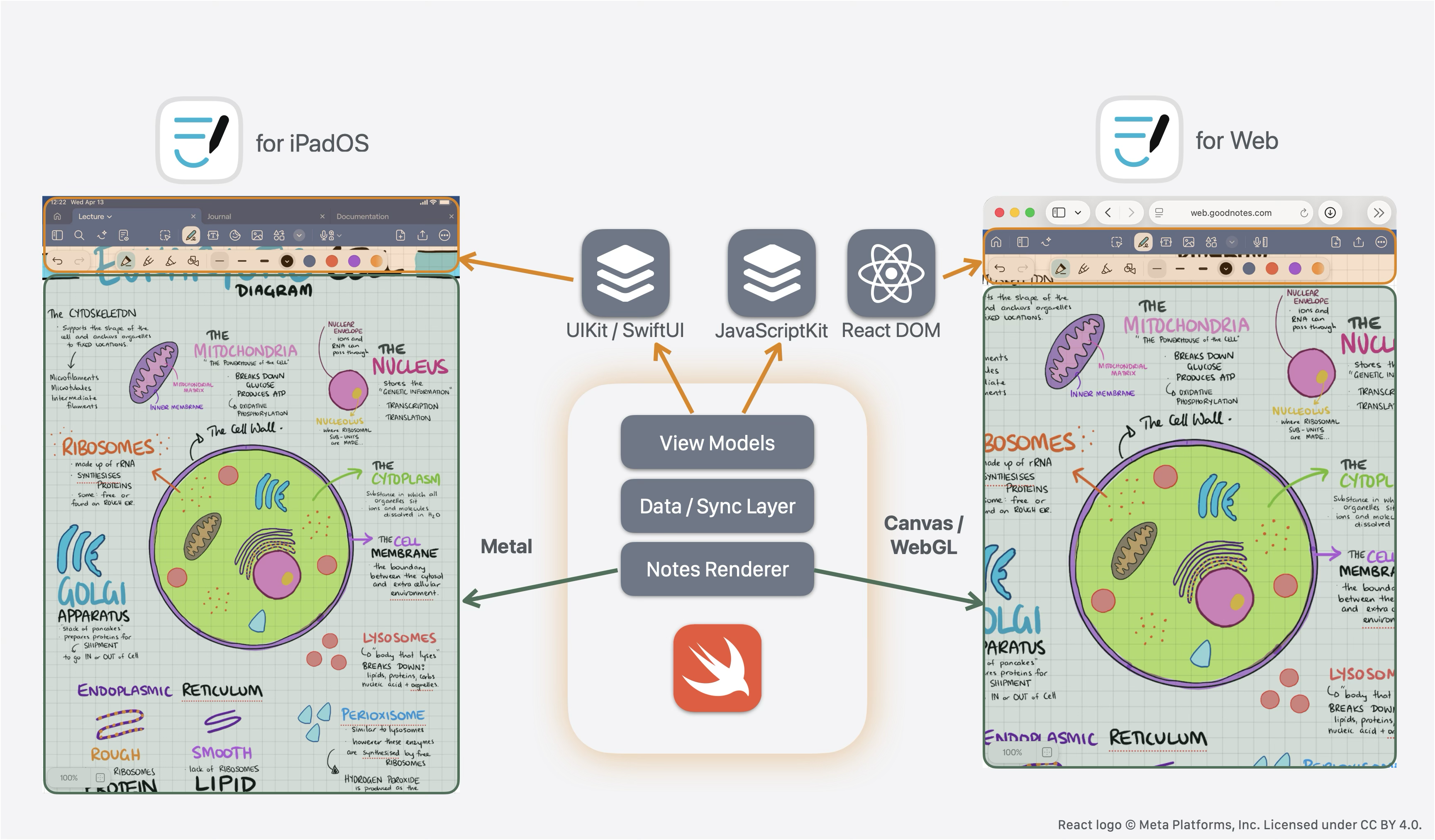
Our architecture is built around a clear separation between platform-specific UI components and shared business logic. This design enables us to maintain behavioral consistency while leveraging platform-native capabilities where appropriate.
Shared core components
The heart of our application consists of three main parts:
Content Rendering Engine: This handles the real-time rendering of notebook content and interactive ink strokes. We use a custom rendering engine built on low-level graphics APIs: Metal on iOS and WebGL on the web. The rendering logic is almost entirely shared, with only platform abstraction layers implemented separately for each platform.
Business Logic Layer: Document modeling, handwriting recognition, and document indexing are all implemented in shared Swift packages.
View Models: Core view models that handle tool interactions and user gestures are shared across platforms.
Code sharing metrics
Our codebase demonstrates significant code reuse:
- Total Web Swift codebase: 2.2 million lines of code
- Shared Swift code: 1.47 million lines (66% of the web app, 34% of the iOS app)
While lines of code isn’t the best metric, these numbers reflect the substantial business logic and rendering engine that we successfully share between platforms.
Binary size and loading
The final WebAssembly binary is approximately 50 MB, which compresses to 12 MB with Brotli compression. We use Service Workers for efficient caching and fast load times for users.
JavaScript interoperability
We use JavaScriptKit for seamless interoperability between Swift and JavaScript. This allows us to integrate with the existing web ecosystem while keeping our core logic in Swift.
Platform compatibility considerations
When sharing code between iOS and WebAssembly targets, we encountered several important considerations:
Concurrency Model: libdispatch APIs are unavailable on WebAssembly targets. We migrated from direct libdispatch usage to Swift Concurrency’s async/await and actors, for better cross-platform compatibility.
Architecture Differences: On wasm32, Swift’s Int has a 32-bit width. Some code assumed Int only held 64-bit values, so it had to be updated to use Int64 explicitly.
Dependency Injection: Network access and other I/O operations are abstracted through dependency injection, allowing us to provide platform-specific implementations while keeping the core logic shared.
Multithreading with WASI threads
One of the most significant technical achievements was implementing true parallelism using WebAssembly System Interface (WASI) Threads with Web Workers and SharedArrayBuffer. This allows us to:
- Run handwriting recognition in background Web Workers
- Perform document indexing without blocking the main thread
- Maintain smooth rendering at more than 60 FPS while processing complex operations
Swift Concurrency’s Custom Actor Executors (SE-0392) were crucial for managing the web platform’s constraints. JavaScript objects are isolated to their originating thread, so we needed precise control over where our Swift actors execute. JavaScriptKit provides several APIs to create a SerialExecutor for a dedicated Web Worker, enabling us to pin specific actors to specific Web Workers.
This architecture ensures that computationally-intensive tasks like handwriting recognition run in the background while UI operations stay on the main thread, while still allowing access to JavaScript objects inside background threads.
Performance Impact: This multithreading approach delivered a greater than 2x improvement in Interaction to Next Paint (INP), significantly enhancing the UI responsiveness during complex operations.
Security Considerations: Modern browser security policies require Cross-Origin Isolation to use SharedArrayBuffer. While this adds some complexity to the application, it’s a necessary trade-off for the performance benefits of true parallelism. For applications that can’t meet these requirements, single-threaded cooperative concurrent execution remains a viable option.
Development experience
One of the most significant aspects of our Swift on WebAssembly experience was the development workflow. The tooling ecosystem is mature and powerful, providing a solid development experience.
IDE support
We can develop using either Xcode or VS Code with SourceKit-LSP, providing full language server support including autocomplete, error checking, and refactoring capabilities.
Xcode doesn’t currently have WebAssembly platform support, so code completion and other features are limited for WebAssembly-specific APIs. SourceKit-LSP, however, has Swift SDK support, so by properly configuring .sourcekit-lsp/config.json, you can get code completion for WebAssembly targets as well.
Debugging and development tools
You can debug Swift code directly in Chrome DevTools: set breakpoints, inspect variables, and step through your Swift code as naturally as JavaScript. We developed a Chrome DevTools extension library that enables Swift-specific variable reflection and source-level debugging, building upon the existing WebAssembly debugging capabilities. For more details on the enhanced DWARF extension for Swift, see the Swift on WebAssembly debugging guide.

Performance profiling
The existing web ecosystem provides powerful performance profiling tools. Chrome’s Performance tab shows exactly where time is spent, down to individual Swift functions, and the Memory tab gives us good insight into memory usage patterns. For most performance optimization tasks, these standard tools are quite effective.
For more advanced cases requiring specialized memory profiling capabilities and detailed heap analysis, the growing WebAssembly ecosystem provided the foundation for building custom tools. We developed wasm-memprof for detailed heap profiling when optimizing memory usage. This tool provides insights into memory allocation patterns that aren’t easily visible through standard web profiling tools.

Contributing back to the community
As part of our journey, we’ve been able to contribute back to the Swift community in meaningful ways. All WebAssembly-related changes have been upstreamed, and the WebAssembly platform has been supported since Swift 6.2! This means that other teams can now benefit from the same tooling and language features that made our project successful.
Lessons learned
Our experience has shown that Swift on WebAssembly is production-ready for complex applications. The language’s safety features, performance characteristics, and modern concurrency model translate well to the web platform.
For teams considering this path, here are our key recommendations:
- Start with a performance-critical component to validate the approach.
- Invest in proper platform abstraction layers early.
- Leverage Swift Concurrency for cross-platform compatibility.
- Plan for the security requirements of SharedArrayBuffer if multithreading is needed.
- Consider gradual adoption rather than complete rewrites for existing projects.
Consider using Swift for your web projects. The growing WebAssembly ecosystem and improved tooling support make this an increasingly viable option for teams looking to share code across platforms.
Get involved with Swift on WebAssembly
Swift has fulfilled its promise as a powerful, expressive language that works everywhere. From mobile devices to servers to web browsers, Swift code can run efficiently while maintaining the safety and performance characteristics that developers appreciate.
The Swift on WebAssembly ecosystem is more accessible than ever. Here’s how you can get involved:
For Developers:
- Try out the Swift on WebAssembly getting started guide and build your first web application.
- Explore the JavaScriptKit Hello World tutorial for hands-on learning.
- Use the WebAssembly debugging guide to set up your development environment.
For SwiftWasm Contributors:
- Participate in discussions with the #webassembly tag on the Swift forums.
- Open issues and contribute to improve the toolchain.
- Share your experiences and help build the community.
With Swift’s official WebAssembly support, we’ve entered a new era of cross-platform development. The same language that powers iOS applications can now create web experiences that are fast, safe, and maintainable.
Swift’s future is increasingly cross-platform, and we’re excited to see what the community builds next.